


Key Takeaways
- A prompt is whatever you give an AI model to respond to: a question, an instruction, or a block of text you want worked on.
- This article explains what goes into a prompt, why small changes in wording change the answer, and how to write one that works.
- You’ll get a simple four-part method, three worked examples, a 90-day practice plan and a checklist.
- The most useful habit is plain, specific writing. The old bag of tricks matters less than it used to.
- The biggest caution: when you use a hosted AI chatbot, your prompt is generally processed by the provider’s systems, and the reply can sound certain while being wrong.
In a Pew Research Center survey fielded in February 2026, 49% of U.S. adults said they use AI chatbots such as ChatGPT, Gemini or Copilot, up from 33% in 2024. Pew changed its question wording between those years, so read the jump as a direction rather than an exact measure. Every one of those users has typed something into a box and waited for a reply. That something is a prompt.
So, what is a prompt in AI, exactly? In short, it’s the text you give a model to respond to, and this guide shows you how to write a good one.
The pattern isn’t only American. Eurostat reports that 32.7% of people aged 16 to 74 in the EU used generative AI tools in the three months before its 2025 survey, and 63.8% of those aged 16 to 24 did. Plenty of those people use the tools weekly without anyone ever explaining what a prompt is, why wording matters, or what happens to the text once they press send.
That gap is what this article fills. By the end you should be able to define a prompt in one sentence, write a clear one for a real task, work out why a bad answer happened, and decide what you shouldn’t type into a chatbot at all. You don’t need to code. You don’t need to buy anything.
Some honest expectations first. A better prompt improves answers quickly, often within the same session, but it won’t turn a chatbot into an expert you can trust without checking. We wrote this the way we try to write everything at AiMoneyGuideCo, with sources named and limits stated.
Here’s the route. We’ll start with a plain definition, look at what’s really inside a prompt, then build a four-slot method with examples from different countries. After that come the risks, a practice plan and answers to the questions beginners ask most.
Read This Before You Start
Timeline. Most people notice better answers the first day they stop sending one-line requests. Becoming dependable for repeat work, such as client emails, product descriptions or study notes, takes longer. We found no published benchmark for how many weeks that takes, so treat “three to six weeks of regular use” as our planning estimate, not a measured figure.
Cost. Chat apps differ by provider and plan, and the offers change often, so this article quotes no prices in USD, EUR, GBP or any other currency. Check each provider’s own pricing page before paying. Developers who call models through an API are billed for usage, and OpenAI’s documentation talks about cutting input token costs, which tells you longer prompts have a cost of their own.
Privacy. With a hosted chatbot, whatever you type is generally processed by the provider. Don’t paste passwords, client files, medical details or anything you couldn’t stand to see made public. The privacy section below explains why.
Accuracy. Chatbots can state false things in a confident voice. Anything that affects money, health, legal standing or a grade needs checking against an original source.
Law and tax. Rules about income, copyright, disclosure to clients and data protection differ by country and by contract. This article doesn’t try to cover them, so confirm the details that apply to you with a qualified professional in your country.
Who this isn’t for. If you want guaranteed-correct output with no checking, no prompt will deliver that. It also isn’t a shortcut around real expertise in medicine, law or tax.
One common way people lose time or money here. They buy prompt packs or courses that promise shortcuts and skip the basics, or they paste unchecked output into paid work. We found no reliable data on how much people spend on such products, so treat this as a pattern to watch, not a statistic.
What Is a Prompt in AI?
A prompt is the input you give an AI model so it can produce a response.
OpenAI’s developer documentation defines prompting as the process of providing input to a model, and says the quality of the output often depends on how well you do it. That covers everything from “What is inflation?” to a three-page brief.
A prompt can be a question, an instruction, some text you want worked on, or a mix of all three. “Rewrite this paragraph so a 14-year-old could follow it” is a prompt. So is a pasted email followed by “Summarize this and list any deadlines.”
If you’ve used ChatGPT, Gemini, Copilot or Claude, you’ve already written hundreds. This article is about writing them on purpose.
What a Prompt Is Not
It isn’t a magic spell. There are no secret words that force a model to be brilliant, and a long prompt isn’t automatically a good one. Anthropic’s own best-practice article lists over-engineering as a common mistake and says longer, more complex prompts are not always better.
It isn’t the same as a search query. A search engine points you to pages that already exist. A chatbot writes new text. Some tools also search the web, but the reply is still words the model produced, which is why checking matters.
It isn’t private by default. When you use a hosted AI chatbot, your prompt is generally processed by the provider’s systems, and we’ll come back to that.
How a Model Turns Your Prompt Into an Answer

You don’t need the engineering, but one idea helps. The UK’s National Cyber Security Centre describes a large language model as an algorithm trained on a large amount of text, which analyses relationships between words and turns them into a probability model; give it a prompt, such as a question, and it answers based on those relationships. OpenAI’s research team describes the learning stage as predicting the next word across huge amounts of text.
The practical consequence is simple. The model can only use the information available in its current context, which may include your prompt, earlier messages, attached files, app instructions or connected tools. If important details are missing from that context, the answer may become generic or inaccurate. Where you leave gaps, it fills them with the most likely wording, which tends to be generic. Vague in, bland out.
What Else Counts as Part of the Prompt
Most beginners think the prompt is the line they type. In real apps the model usually sees more than that.
There can be hidden instructions set by the app or the developer, often called a system message. There’s the earlier conversation. There are any files you’ve attached and any text you’ve pasted. OpenAI’s prompting guide suggests putting overall tone or role guidance in the system message and keeping task details and examples in the user’s message.
Anthropic’s article makes a related point, describing a prompt as one building block inside a larger context that also includes conversation history, attached files and system instructions. The NCSC calls the act of pasting extra material into a question “prompt augmentation”.
Two things follow. First, a long chat piles up instructions, and old ones can quietly interfere with new requests. Starting a fresh chat for a new task is a cheap fix, though that’s our advice rather than a tested rule. Second, anything you paste is part of the prompt, which matters for privacy and, as we’ll see, for security.
The Main Kinds of Prompts
Here are the common prompt types, with a plain example of each.
| Type | What it does | Example |
|---|---|---|
| Question | Asks for information | What is the difference between gross and net salary? |
| Instruction | Asks for an action | Rewrite this paragraph in plain English for a 14-year-old reader. |
| Material plus task | Gives text to work on | Summarize the email below in three sentences, then list any deadlines. |
| Audience or role | Sets the viewpoint | Explain this to a small shop owner with no accounting background. |
| Example-led | Shows the pattern you want | Here are two product descriptions I like. Write a third in the same style for a canvas tote bag. |
| Multi-part | Splits a big job | First list ten blog topics. I’ll choose one, then you outline it. |
Notice that the best ones tell the model who the answer is for and what shape it should take. That leads to the method below.
Weak Prompt, Strong Prompt
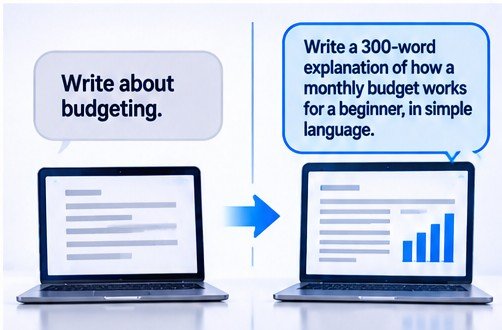
Weak: “Write about budgeting.”
The reply will be generic, because the prompt hasn’t said who’s reading, how long it should be or what the reader should do afterwards.
Stronger: “Write a 300-word explanation of how a monthly budget works. The reader just got their first salary and has never tracked spending. Keep the tone friendly and avoid jargon. End with three questions they can answer to start their own budget.”
Same topic, very different result, and the second version took thirty extra seconds. Anthropic’s article makes the same point with its own pair of examples, where a bare request for an analytics dashboard is contrasted with one that spells out the features and level of depth wanted. Its advice is to state exactly what you want rather than hope the model infers it.
Money topics are a common place for beginners to start, and our guide to AI prompts for personal finance planning applies this same method to budgets, savings goals and other everyday money tasks.
How to Write a Good Prompt: The Four-Slot Method (Our Framework)

Most good prompts fill four slots. We call this the Four-Slot Prompt, and it fits on a sticky note.
- JobWhat you want done, in one clear verb: write, compare, summarize, check, plan.
- BackgroundWho the answer is for, why you need it, and any material the model should use. Anthropic’s article says explaining the purpose helps newer models aim at your real goal.
- ShapeLength, format, tone and language. “Two short paragraphs, plain English, no bullet points” is a complete Shape slot.
- EdgesLimits and permission. What to avoid, and what to do when information is missing. Anthropic recommends giving the model explicit permission to say it’s unsure, which it says reduces made-up answers.
A fill-in template looks like this:
Job: Draft a reply to a client who asked for the project a week early.
Background: I’m a freelancer. The client is friendly but pushes deadlines. I can deliver three days early, not seven.
Shape: Under 120 words, polite and firm, no apologies.
Edges: If you need a detail I haven’t given, ask me instead of guessing.
You don’t need the labels in real use. One sentence per slot is enough.
The Two-Try Rule (Our Decision Rule)
Here’s the rule we suggest, and it’s a rule of thumb, not a tested result. If an answer misses the mark after two corrections, stop patching it. Go back to the four slots, find the one you left empty, and send a rewritten prompt in a new chat.
The reasoning is that long chains of corrections pile up half-conflicting instructions. Anthropic notes that the first prompt rarely works perfectly and that you should test and refine, which supports iterating. The two-attempt limit is our own addition.
Three Worked Examples
These are hypothetical, kept realistic, and they show prompts rather than promised results.
A freelance translator in Karachi needs to tell a client that a certified translation will take two extra days. First attempt: “Write an email about a delay.”
Better attempt: “Write a short email to a long-standing client. Job: tell them the certified translation will arrive Thursday instead of Tuesday. Background: the delay is due to waiting for a reviewer. Shape: three sentences, warm and professional. Edges: don’t promise compensation and don’t blame the client.”
Client emails like this come up constantly in freelance work, and our guide to AI prompts for freelancers covers 40 more situations in the same format.
A shop owner in Manchester sells hand-printed tote bags and wants product descriptions.
Better prompt: “Write a 60-word product description for a hand-printed canvas tote bag in the style of the two examples below. Mention the material and the size, and leave out claims about being eco-friendly unless I’ve stated them. Examples: [paste two descriptions].”
The owner leaves customer names and order details out of the chat entirely.
If you run a shop or a small company, our AI prompts for small business owners show how the same method handles everyday business jobs.
A student in Madrid is revising for an economics exam.
Better prompt: “Quiz me on supply and demand, one question at a time. Start easy, wait for my answer, then tell me what I got right and wrong. If you’re not sure about a fact, say so.”
The student then checks any disputed point against the textbook.
In each case the improvement comes from the same place. The prompt says who the reader is, what shape the output should take and what the model should do when it doesn’t know.
Techniques for After the Basics

Once the four slots feel natural, a few extras help. Each is described in Anthropic’s guide.
Show an example
When a format is easier to show than describe, include one sample. Anthropic suggests starting with one and adding more only if the output still misses. Marketing copy is a good place to try this, and our AI prompts for marketing include 40 examples you can adapt.
Ask for reasoning on hard tasks
For complex tasks, ask the model to explain its approach, show the key steps or calculations, and check the final result. The exact reasoning features available depend on the tool and plan.
Split big jobs
Anthropic calls this prompt chaining. You ask for an outline, review it, then ask for a draft. It takes longer and usually gives steadier results than one giant request.
Say what you want, then add what to avoid
State the desired result clearly, then add any important exclusions. Positive instructions explain what to produce; negative constraints explain what must be avoided. For example, “Write in flowing paragraphs” often works better than a bare “don’t use bullet points.”
Here are common problems and their likely fixes, based on Anthropic’s troubleshooting list.
| Problem | Likely fix |
|---|---|
| Answer is too generic | Add specifics, audience and an example |
| Answer misses the point | State your actual goal and why you’re asking |
| Format keeps changing | Show one sample of the format |
| Task is too big and results wobble | Split it into smaller prompts |
| Facts look invented | Give permission to say “I don’t know,” then verify |
What Has Changed: Less Scaffolding
If you’ve seen old guides with elaborate templates, be a little wary. Anthropic’s article says XML tags and heavy role-play prompts were once recommended and are less necessary with current models, and it warns against using every technique at once. It also says prompting is merging into what it calls context engineering, with less scaffolding and more careful choice of what the model sees.
That guidance is dated November 2025, and this field moves quickly, so check the provider’s current documentation if you’re building something serious.
Prompts for Images, Voice and Code
The core idea carries over. Whether you’re asking for a picture, a voice reply or a snippet of code, you’re giving a model input and getting output. OpenAI’s documentation keeps separate prompting pages for image generation and for voice, which hints that the details differ by medium. Start with the four slots and then read the guide for the specific tool.
Where Prompting Stops Working
We should be blunt about the limits, because the internet isn’t. A prompt can’t supply facts the model doesn’t have, and it can’t guarantee truth. OpenAI’s research on hallucinations defines them as plausible but false statements, and describes asking a widely used chatbot for the title of an author’s PhD dissertation and getting three different answers, none of them correct. The same research argues that accuracy will never reach 100% because some questions can’t be answered, and that models can choose to abstain when uncertain.
Warning
A good prompt can ask for caution. It can’t remove the risk. If the answer will go into a client report, a tax return or a medical decision, verify it at the source.
Mistakes Beginners Make, and What They Cost
Mistake 1: The one-line prompt for a big job
Cost: generic output and extra rounds of back and forth. Lesson: fill the four slots before you send.
Mistake 2: Trusting a confident tone
A fluent answer isn’t a verified one. Cost: wrong facts in an assignment or a client deliverable. Lesson: check the numbers, names and dates that matter, and ask the model to flag what it’s unsure about.
Mistake 3: Pasting sensitive material into a public tool
Cost: your text may now sit with a third party. Lesson: strip names, account numbers and addresses before you paste, or don’t paste at all.
Mistake 4: Over-engineering
Beginners sometimes stack every technique they’ve read about into one monster prompt. Cost: time, and often worse output. Lesson: start simple and add one change at a time, as Anthropic advises.
Mistake 5: Buying before learning
Prompt packs and paid courses can be fine, but free official guides from Anthropic and OpenAI cover the fundamentals. Cost: money spent on material that may be out of date within months. Lesson: read the free guides first, then judge whether a paid product adds anything.
Privacy and Safety

When you use a hosted AI chatbot, your prompt is generally processed by the provider’s systems. Local AI tools and different service configurations may handle data differently, so check the tool’s privacy policy and data settings.
The NCSC’s guidance is the clearest short statement we found. In a post published on 14 March 2023, it said that, as of writing, a large language model doesn’t automatically add the information in your query to its model for others to see.
It also said the query is visible to the provider, is stored, and will almost certainly be used to develop the service at some point. It added that stored queries could be hacked, leaked or accidentally made public. Its recommendations were not to include sensitive information in queries to public models, and not to submit queries that would cause problems if they were made public.
That post is more than three years old, and providers’ terms and settings have changed since then. Read the current privacy policy and the data controls of any tool you use.
Practical habits that follow from it:
- Swap real names for placeholders such as Client A.
- Leave out account numbers, passwords, addresses and health details.
- Ask yourself whether you’d be comfortable if the prompt appeared on a screen at work.
- Follow your employer’s or client’s rules about AI tools if they have them.
In the UK and EU the legal framework is usually called data protection, and in the US it’s more often called privacy. Either way, other people’s personal data deserves extra care. We haven’t reviewed those laws here, so check with a professional if you handle customer or client data.
Prompt Injection: When a Document Talks Back
Here’s a risk beginners rarely hear about. In 2025 the US National Institute of Standards and Technology published a taxonomy of attacks on AI systems, and for generative AI it covers direct and indirect prompt injection, along with limits on the defenses.
Prompt injection is an attack that attempts to influence an AI model by placing instructions in the prompt or in external content the model processes. The goal may be to override intended instructions, expose information or trigger unwanted actions.
The attack does not always succeed, but it can create serious risks when an AI tool has access to files, websites or connected services. The indirect version hides the instructions in content you ask the tool to process, such as a web page or a PDF.
For everyday use, a few habits help. Be cautious when asking a tool to summarize content from sources you don’t trust. Treat unexpected instructions, links or requests for personal details in an AI reply with suspicion.
If a tool can send emails or change files on your behalf, require it to ask before acting. Those habits are our suggestions, and the underlying report is NIST’s AI 100-2 E2025, published in March 2025.
Risk Levels for Everyday Prompting
These risk levels run from small to large. They are our assessment, not a measured score.
| Level | Example | Realistic worst case | What reduces it |
|---|---|---|---|
| Small | A vague prompt wastes ten minutes | Lost time | Use the four slots |
| Medium | A false fact reaches a client email or an essay | Lost trust, a lower grade, a corrected invoice | Verify anything that matters |
| Large | Confidential client or personal data pasted into a public tool | Privacy breach, breach of contract, possible legal exposure depending on the country | Don’t paste it; check your contract and the tool’s terms |
Prompts at Work and for Developers
If you build software on a model, OpenAI’s guidance is to treat prompts as application code, with versioning, review and tests. It also says prompt objects stored in its API are being retired, with prompt creation de-emphasized from 3 June 2026 and the v1/prompts endpoint scheduled to shut down on 30 November 2026, as we checked in November 2026. Anyone with prompts stored that way should read the migration guide on the same OpenAI page.
For non-developers the lesson is smaller but real. If you use a prompt every week, save it in a document you control rather than relying on one chat’s history.
Is Prompting a Side Income?
We looked for reliable figures on what people earn selling prompts or working in prompt-focused jobs, and didn’t find a source that met our standard. So we make no income claims, and we’d be wary of anyone who does.
There are some things we can say. Models and best practice change, and Anthropic’s own article notes that techniques popular a couple of years ago have faded, so a purchased prompt can age quickly. Free official guides already cover the basics. The skills more likely to keep their value are clear writing, domain knowledge and the habit of checking output, which is our view rather than a measured finding.
If you’re looking at the wider picture of earning online, our guide on how to make money online is a better starting point than any single skill.
When a Prompt Isn’t the Answer
A chatbot is a poor tool for some jobs. For current prices, tax rates, legal deadlines and official forms, go to the official website. For a diagnosis, a contract review or a tax filing, use a qualified professional. A chatbot can still help you prepare, for instance by drafting questions to ask that professional, but it shouldn’t be the last word.
Your 90-Day Action Plan

- Weeks 1 and 2Write ten prompts for real tasks you already do, using the four slots. Save the three best. Target: at least seven of ten usable after one revision.
- Weeks 3 and 4Add one example to any prompt where format matters, and add “if you’re unsure, say so” to every factual request. Check the facts in five outputs against an official or primary source and log each error you find. Target: a written error count, even if it’s zero.
- Month 2Build a personal library of five templates for your most common tasks. Practice chaining on one longer job, such as outline first and draft second. Run one prompt in two different tools and compare. Target: five saved templates and one written comparison.
- Month 3Audit your privacy habits. Write a short list of things you will never paste into a public tool. Check the data settings and current pricing page of any tool you rely on before deciding whether a paid plan is worth it. Track the minutes you save per week on three recurring tasks. Target: one page of personal rules and a number for time saved.
Month 2 is also a good time to borrow starting points. Our AI prompts for business tasks give you ready-made wording to adapt into your own template library.
Your Checklist

Before you send a prompt
- Is the job stated with one clear verb?
- Does it say who the answer is for and why you need it?
- Have you given the length, format, tone and language?
- Have you told it what to do if information is missing?
- Is any sensitive data removed or replaced?
After you get an answer
- Have you checked any figure, name, date or law that matters against a primary source?
- Did you notice any unexpected instruction or link in the reply?
- If it missed twice, did you rewrite the prompt instead of patching the answer?
Region notes. US and UK spellings differ (summarize and summarise), which rarely changes results. Privacy rules differ by country; see the regional notes below and check your own.
Regional Considerations
We only include regions where we opened and verified a source.
United States
Pew’s February 2026 survey found 49% of adults use AI chatbots, and Pew’s report put ChatGPT use at 44%. Pew also notes that survey wording changed from 2024, so compare carefully.
United Kingdom
The NCSC’s guidance, published in March 2023, remains a clear public statement of why not to put sensitive information into public chatbots, though providers’ terms have changed since.
European Union
Eurostat’s 2025 data shows use varies widely by country and age. Among 16 to 24 year-olds, shares ranged from 83.5% in Greece to 44.1% in Romania, against an EU figure of 63.8%.
Asia-Pacific, the Middle East, Africa and Latin America
We didn’t verify region-specific sources for these markets in this article, so we’ve left them out rather than guess. The prompting advice above doesn’t depend on where you live, but local privacy and tax rules do.
Frequently Asked Questions
A prompt is the input you give an AI model so it can respond. It can be a question, an instruction, text to work on, or all three. “Summarize this email in three sentences” is a prompt. The clearer it is about the job, audience and format, the more useful the reply usually is.
Prompt engineering is the practice of writing and refining prompts to get better results from AI models. Anthropic describes it as the craft of structuring instructions, including how you phrase queries, set style and provide context. For beginners it mostly means writing clearly, adding context and testing changes one at a time.
Not quite. A command usually gives software a more explicit instruction to perform an action. A prompt guides a generative model, whose response can vary depending on context, model settings and other factors. That is why the same prompt may not always produce identical wording or results.
No. Everyday prompts are written in ordinary language. Coding knowledge becomes useful if you build apps that call models through an API, or if you want the model to write code. For summarizing, drafting and studying, plain writing skills matter much more.
As long as it needs to be to fill the four slots, and no longer. A simple request can be one sentence. A complex task may need several short paragraphs. Anthropic’s guidance warns that longer isn’t automatically better, so add detail only where the first answer fell short.
Models generate text rather than look up fixed answers, so replies can vary. OpenAI’s own hallucination research describes a chatbot giving three different answers to the same question about a dissertation title, none correct. If consistency matters, show an example of the format and verify the facts.
Treat it as unsafe unless you’ve read the provider’s terms and settings. The UK’s NCSC advised not to include sensitive information in queries to public chatbots, because queries are visible to the provider and may be stored or leaked. Use placeholders and leave out anything you’d regret seeing public.
It can reduce the risk but not remove it. Asking the model to say when it’s unsure, and to stick to material you supply, helps. OpenAI’s research says some questions can’t be answered, so accuracy can’t reach 100%. For anything important, check the answer against a primary source.
A system prompt, or system message, is a set of instructions supplied by an app or developer that shapes how the model behaves, such as its tone or role. You usually don’t see it. OpenAI’s guidance suggests keeping overall tone and role guidance there and putting task details in the user’s message.
Prompt injection is an attack that tries to influence an AI model by placing instructions in the prompt or in external content it processes. It does not always succeed, but it can matter when a tool has access to files, websites or connected services. NIST’s 2025 report covers direct and indirect forms. If you ask a tool to process content from untrusted sources, treat any odd instructions in the reply with caution.
We can’t say, because we found no reliable data on their value or on what sellers earn. Free official guides from Anthropic and OpenAI cover the fundamentals, and techniques age fast. Read those first, try the four slots on your own tasks, then judge whether a paid product teaches you anything new.
Final Summary
So, what is a prompt? It is simply the input you give an AI model, and learning to write a good one is mostly learning to write clearly. Say what job you want done, who the answer is for, what shape it should take and what the model should do when it doesn’t know. Those are the four slots, and they cover most everyday needs.
The bigger shift is in how you treat the answers. A fluent reply isn’t a verified one, and a prompt typed into a hosted chatbot is generally processed by the provider’s systems, so it isn’t a private note. Checking facts that matter and keeping sensitive material out of public tools will protect you more than any clever phrasing.
A realistic outcome for a beginner is faster drafts, clearer study notes and fewer wasted attempts within a few weeks, with the caveat that we can’t measure your gains for you. That’s an expectation, not a promise. If you track the minutes you save and the errors you catch, you’ll know soon enough whether the habit is paying off.
Your next move is small. Pick one task you did this week, rewrite the request using the four slots, and compare the result with what you got before. Then try the two-try rule the next time an answer misses. Keep the free official guides bookmarked and check them again in a few months, because the advice is changing as the models do.
Sources and Further Reading
- Pew Research Center, About half of U.S. adults now use AI chatbots, up from a third in 2024
- Eurostat, 64% of 16-24-year-olds used AI in 2025
- OpenAI, Prompting (API documentation)
- UK National Cyber Security Centre, ChatGPT and large language models: what’s the risk?
- Anthropic, Prompt engineering best practices for 2026
- OpenAI, Why language models hallucinate
- OECD.AI, NIST AI 100-2e2025 policy navigator entry
- NIST, AI 100-2 E2025 Adversarial Machine Learning
- What Is a Prompt in AI?
- What a Prompt Is Not
- How a Model Turns Your Prompt Into an Answer
- What Else Counts as Part of the Prompt
- The Main Kinds of Prompts
- Weak Prompt, Strong Prompt
- How to Write a Good Prompt: The Four-Slot Method (Our Framework)
- The Two-Try Rule (Our Decision Rule)
- Three Worked Examples
- Techniques for After the Basics
- What Has Changed: Less Scaffolding
- Prompts for Images, Voice and Code
- Where Prompting Stops Working
- Mistakes Beginners Make, and What They Cost
- Privacy and Safety
- Prompt Injection: When a Document Talks Back
- Risk Levels for Everyday Prompting
- Prompts at Work and for Developers
- Is Prompting a Side Income?
- When a Prompt Isn’t the Answer
- Your 90-Day Action Plan
- Your Checklist
- Regional Considerations
- Frequently Asked Questions
- Final Summary
- Sources and Further Reading
Share this article
Was this article helpful?
Private feedback for our team. It is not published. To discuss publicly, use the comments below.






Join the Discussion
0 comments
Share a question, a tip or what worked for you. Please keep it helpful and on topic.
No comments yet. Be the first to share your thoughts.